
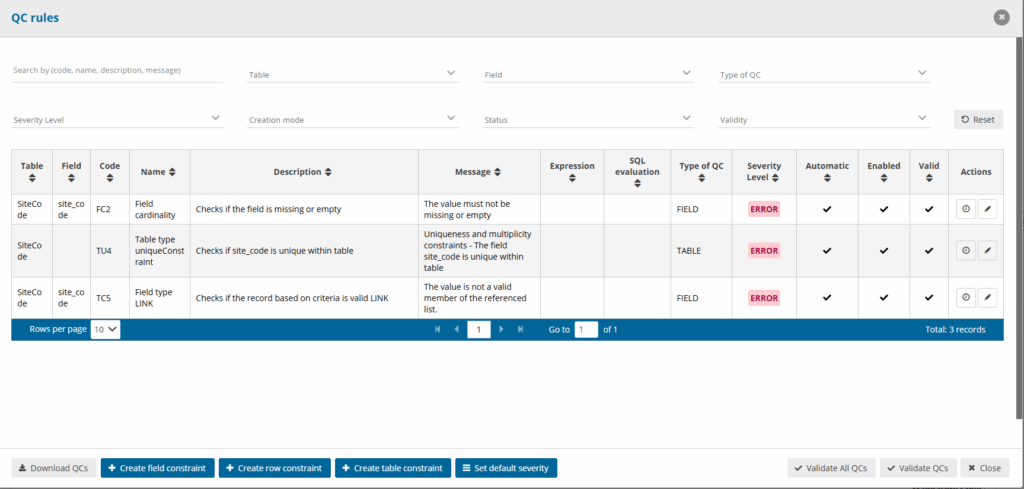
The Expression Builder has two modes:
- Expression Builder (non-SQL): You create rules using dropdowns and value fields. The frontend translates this into a JSON structure, which the Java backend converts into a Java method call. Non-SQL rules behave identically on Citus and Big Data (Dremio)
- SQL Sentence / SQL Sentence (Big Data): You write a raw SQL query.
SQL Sentence rules are highly backend-specific. Citus queries are executed by PostgreSQL; Big Data queries are executed by Dremio.
Expression Types and Level Options
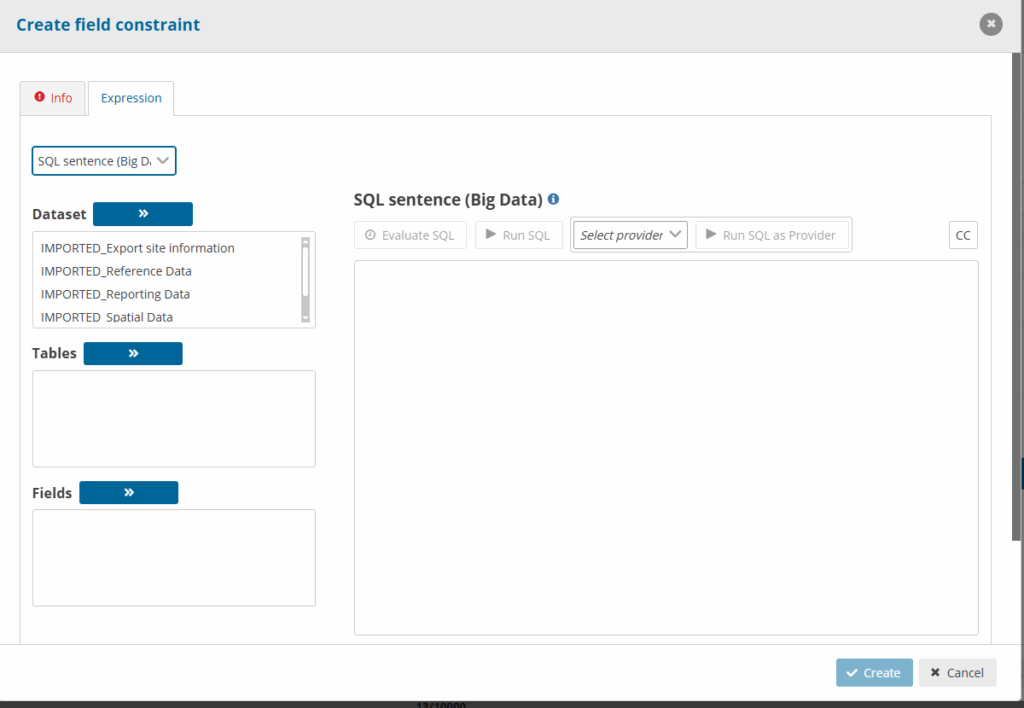
When creating a validation, your level (Field, Row, or Table) determines the expression modes available:
Field level
- Field Comparison: Build comparisons using standard operators and input values.
- SQL Sentence / SQL Sentence (Big Data):Write raw SQL query.
- Spatial constraint: If the field type is a spatial type (
Point,Polygon, etc.), the UI only allows SQL Sentence mode. Field Comparison is blocked.
- Spatial constraint: If the field type is a spatial type (
- Field Comparison: Compare multiple fields within the same row.
- If-Then Clause: Create logical conditional check:
IF (condition A) THEN (condition B). - SQL Sentence / SQL Sentence (Big Data): Raw SQL query.
SQL Sentence / SQL Sentence (Big Data): Raw SQL query.
Dataset Comparison: Cross-table or cross-field relation checks.
Operator Types and Dropdown Groups
The dropdown group options in the UI are determined dynamically by the field type being validated:NUMBER_INTEGER: Number, Length
NUMBER_DECIMAL: Number
TEXT, TEXTAREA, RICH_TEXT, EMAIL, PHONE, URL, LINK, CODELIST, MULTISELECT_CODELIST, ATTACHMENT: Length, String
DATE: Date, Day (Date), Month (Date), Year (Date)
DATETIME: Date time, Day (DateTime), Month (DateTime), Year (DateTime)
Available Operators Reference
- Number:
>,<,>=,<=,=,!=,MATCH(Regex input),IS NULL,IS NOT NULL.- Note: Decimals must use a dot (
.) as a separator.
- Note: Decimals must use a dot (
- Length:
>,<,>=,<=,=,!=.- Note: Valid length numbers must be integers of -1 or greater.
- String:
=,= (Ignore case),MATCH(Regex input),IS NULL,IS NOT NULL. - Date / Date time:
>,<,>=,<=,=,!=,IS NULL,IS NOT NULL.- Format: Date uses
YYYY-MM-DD. DateTime uses timezone-aware calendar formatvYYYY-MM-DDTHH:mm:ssZ.
- Format: Date uses
- Day / Month / Year:
>,<,>=,<=,=,!=.
Valid ranges:Day:0–32, Month:0–13, Year:1000–9999(Values outside are reset to 0 by the UI).
Citus vs. Big Data (Dremio) QC Rule Differences
Non-SQL Expressions (Field / Row / Relation Comparisons)
Because both environments use the same Java-based Drools rules engine for execution, the logic behaves the same. However, keep in mind:
- Null Handling: Dremio datasets fetched from S3/Parquet represent empty cells as SQL NULLs. In Citus, empty cells can sometimes exist as empty strings (
""). The Java backend treats both as blank, meaningIS NULLis safe to use in both. - Date/Time Offsets: Dremio datetime fields return timestamps in UTC with a
Zoffset. While the Java engine parses this, make sure any literal comparisons in value boxes match the ISO date formatYYYY-MM-DDTHH:mm:ssZ.
SQL Sentence vs. SQL Sentence (Big Data) Differences
This is where the syntax and capabilities differ significantly. When migrating a dataflow from Citus to Big Data (Dremio), you must rewrite your SQL query according to the following syntax rules:
| SQL Feature | Citus (PostgreSQL) | Big Data (Dremio) |
|---|---|---|
| String Equals (Case Insensitive) | column ILIKE 'value' | LOWER(column) LIKE 'value' |
| Regular Expressions | column ~ 'pattern' or REGEXP_MATCHES(column, 'pattern') | REGEXP_LIKE(column, 'pattern') |
| Casting Types | column::TEXT or column::numeric | CAST(column AS VARCHAR) or CAST(column AS DOUBLE) |
| Date Truncation | DATE_TRUNC('year', column) | DATE_TRUNC('YEAR', column) (requires uppercase format string) |
| String Concatenation | col1 || col2 | CONCAT(col1, col2) or || |
| Date Difference | date1 - date2 (returns integer) | DATEDIFF(date1, date2) |
| Subqueries / Joins | Postgres join optimization | Must specify S3 path folders explicitly |
SQL Sentence Rules & Features Enforced by Frontend
Regardless of whether Citus or Big Data is used, the frontend applies these validations:
- LIMIT / OFFSET Restrictions: The frontend checks the query with a regex:
/\b(limit|offset)\s*\d*$/i. If found at the end of the query, saving is blocked with: “LIMIT and OFFSET are not allowed at the end of an SQL sentence.” - Provider Acronym Button: You can click the acronym button (e.g.
CC/CO) to insert{%R3_COUNTRY_CODE%}. The engine evaluates the rule against the active reporter code. - SQL Cost Evaluation: Clicking “Evaluate SQL” asks the backend to estimate the query cost. The frontend displays the complexity using a Traffic Light system (Green, yellow, Red).
Common Pitfalls Checklist for Consultants
Decimal Separator: Always use a dot (.) and not a comma (,) in numeric expression inputs.
Trailing Semicolons in Regex: Do not add a ; inside the Expression Builder “Value” input text box when using MATCH. It is treated as a literal character in the regular expression and the match will fail.
Spatial Types: Remember that spatial data types (Point, Polygon, etc.) are classified as nonSql by the UI config, and only support the SQL Sentence input type.
Double Quotes for Identifiers: In SQL Sentence mode, if a field or table name starts with a number or contains special symbols, you must wrap it in double quotes and write the name in lowercase (e.g. "2023_data").
Spatial Function Prefix: PostGIS functions in SQL Sentence must be prefixed with public. (e.g., public.ST_Distance).