
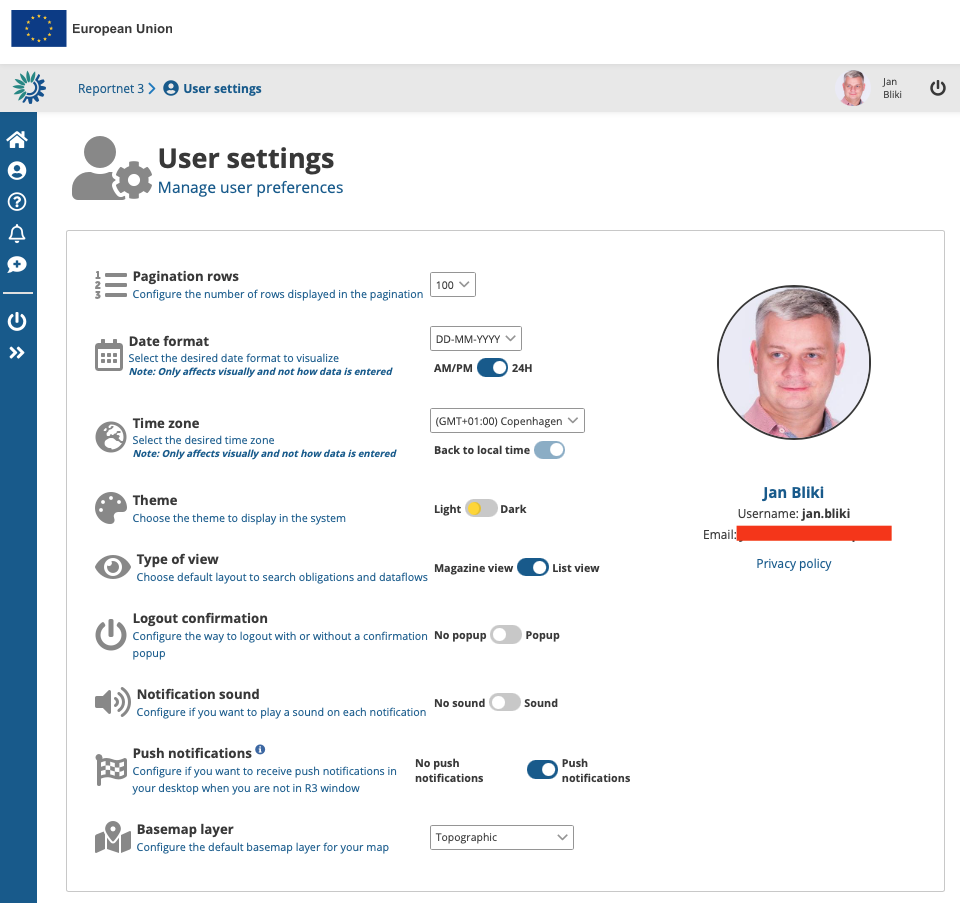
The users settings are generic settings Reportnet will use when navigating the website.
How to change my user settings
- On any screen, click on the “User profile details” button in the left context menu or click on your user picture on the top right.
- Available global settings can be managed from this page.
- Pagination rows – Configure the number of rows displayed in the pagination.
- Date format – Select the desired date format to visualize.
- Time zone – Your time zone. This information will not change the actually reported data but will convert the global time representation into your local time.
- Theme – Choose the theme to display in the system.
- Type of view – Choose default layout to search obligations and dataflows.
- Logout confirmation – Configure the way to logout with or without a confirmation popup.
- Notification sound – Choose if you wish sound to be used on your desktop when notification popup.
- Push notifications – When activated your windows notification will display Reportnet notifications.
- Basemap layer – Configure the default basemap layer for your map-views.
How to change my profile photo
- In the profile details described above you will see a “picture space”.
- Click on the picture space or on your picture.
- You can select an avatar or upload a photo from your desktop.