
EU Login is the entry gate to sign in to the Reportnet 3 platform as well as different European Commission services and/or other systems. EU Login verifies your identity and allows recovering your personal settings, history and access rights in a secure way.
Go towards the login page by clicking on the “login” button.
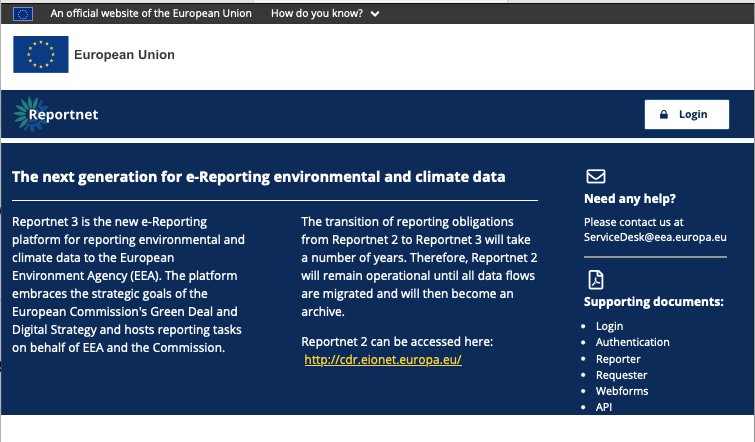
Click on the “Create an account” link on the EU Login sign-in page.
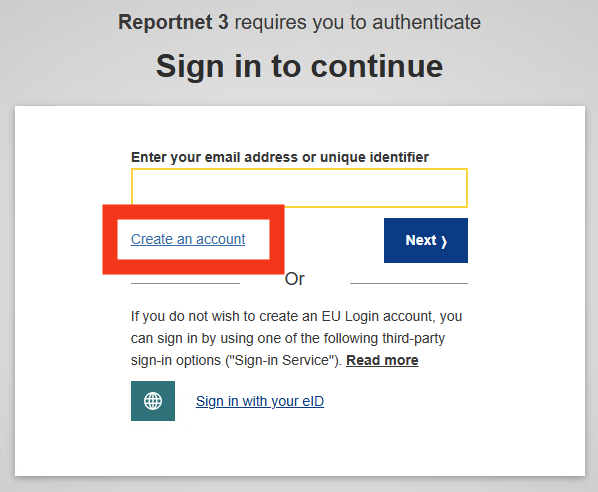
Fill in the provided form with your personal details:
- First name– Your first name cannot be empty and can contain letters in any alphabet;
- Last name– Your last name cannot be empty and can contain letters in any alphabet;
- E-mail– An e-mail address that you have access to;
- Confirm e-mail– Type your e-mail address again to make sure it is correct;
- E-mail language– The language used when EU Login sends you e-mails
regardless of the language used in the interface. It guarantees that you are able to understand these e-mails even if they were triggered mistakenly. EU Login only sends you e-mails for validating your identity or for notifying you about security events affecting your account; - Enter the code– By entering the letter and numbers in the picture, you
demonstrate that you are a human being who is legitimately creating an account. If the code is too difficult to read, click on the button with two arrows to generate a new one; - Check the privacy statement by clicking on the link and tick the box to accept the conditions;
- Click on “Create an account” to proceed.
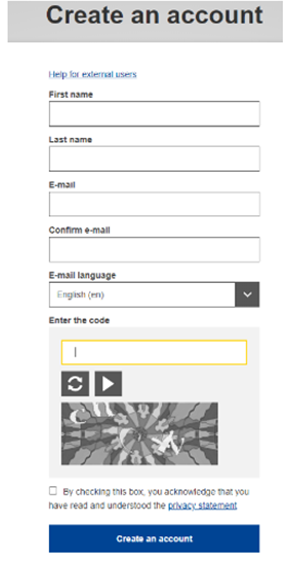
If the form is correctly filled in, an e-mail is sent to the address you provided in order to verify that you have
access to it. If you cannot find the e-mail, check your spam or junk folder. Click the link in the e-mail or copy/paste it in the address bar of your browser.
You are invited to select a password and to confirm it to make sure you did not mistype it.
Your new password must contain at least 10 characters and a combination of:
- upper case letters,
- lower case letters,
- numbers and
- special characters
The E-mail field is prefilled and cannot be changed. It should contain the e-mail address you provided previously. Type your password again in the “Confirm new password” and click on “Submit“.
You now have an EU Login account and can proceed with the login for Reportnet 3 from the home page
As this is the first time you will login in to the Reportnet 3 platform, there are some additional steps to follow (next
section) after you have been authenticated.